Section 3
Self-Supervised Learning – MoCo
Estimated Time: ~25 minutes
In this tutorial, we will train a model based on the MoCo Paper Momentum Contrast for Unsupervised Visual Representation Learning.
When training self-supervised models using contrastive loss we usually face one big problem. To get good results, we need many negative examples for the contrastive loss to work. Therefore, we need a large batch size. However, not everyone has access to a cluster full of GPUs or TPUs. To solve this problem, alternative approaches have been developed. Some of them use a memory bank to store old negative examples we can query to compensate for the smaller batch size. MoCo takes this approach one step further by including a momentum encoder.
In this tutorial you will learn:
-
How to use lightly to load a dataset and train a model
-
How to create a MoCo model with a memory bank
-
How to use the pre-trained model after self-supervised learning for a transfer learning task
import copy

import pytorch_lightning as pl
import torch
import torch.nn as nn
import torchvision

from lightly.data import LightlyDataset
from lightly.loss import NTXentLoss
from lightly.models import ResNetGenerator
from lightly.models.modules.heads import MoCoProjectionHead
from lightly.models.utils import (
    batch_shuffle,
    batch_unshuffle,
    deactivate_requires_grad,
    update_momentum,
)
from lightly.transforms import MoCoV2Transform, utils
Configuration
We set some configuration parameters for our experiment. Feel free to change them and analyze the effect.
The default configuration uses a batch size of 512. This requires around 6.4GB of GPU memory.
num_workers = 8
batch_size = 512
memory_bank_size = 4096
seed = 1
max_epochs = 20
path_to_train = "C:/Workshop/dataset_SSL/train/"
path_to_test = "C:/Workshop/dataset_SSL/test/"Let's set the seed to ensure reproducibility of the experiments
pl.seed_everything(seed)# Setup data augmentations and loaders
# disable blur because we're working with tiny images
transform = MoCoV2Transform(
input_size=32,
gaussian_blur=0.0,
)We create custom, torchvision based data transformations. Let's ensure the size is correct and we normalize the data in the same way as we do with the training data.
train_classifier_transforms = torchvision.transforms.Compose(
    [
        torchvision.transforms.RandomCrop(32, padding=4),
        torchvision.transforms.RandomHorizontalFlip(),
        torchvision.transforms.ToTensor(),
        torchvision.transforms.Normalize(
            mean=utils.IMAGENET_NORMALIZE["mean"],
            std=utils.IMAGENET_NORMALIZE["std"],
        ),
    ]
)

# No additional augmentations for the test set
test_transforms = torchvision.transforms.Compose(
    [
        torchvision.transforms.Resize((32, 32)),
        torchvision.transforms.ToTensor(),
        torchvision.transforms.Normalize(
            mean=utils.IMAGENET_NORMALIZE["mean"],
            std=utils.IMAGENET_NORMALIZE["std"],
        ),
    ]
)

# We use the moco augmentations for training moco
dataset_train_moco = LightlyDataset(input_dir=path_to_train, transform=transform)

# Since we also train a linear classifier on the pre-trained moco model we
# reuse the test augmentations here (MoCo augmentations are very strong and
# usually reduce accuracy of models which are not used for contrastive learning.
# Our linear layer will be trained using cross entropy loss and labels provided
# by the dataset. Therefore we chose light augmentations.)
dataset_train_classifier = LightlyDataset(
    input_dir=path_to_train, transform=train_classifier_transforms
)

dataset_test = LightlyDataset(input_dir=path_to_test, transform=test_transforms)
Create the dataloaders to load and preprocess the data in the background.
dataloader_train_moco = torch.utils.data.DataLoader(
    dataset_train_moco,
    batch_size=batch_size,
    shuffle=True,
    drop_last=True,
    num_workers=num_workers,
)

dataloader_train_classifier = torch.utils.data.DataLoader(
    dataset_train_classifier,
    batch_size=batch_size,
    shuffle=True,
    drop_last=True,
    num_workers=num_workers,
)

dataloader_test = torch.utils.data.DataLoader(
    dataset_test,
    batch_size=batch_size,
    shuffle=False,
    drop_last=False,
    num_workers=num_workers,
)
Create the MoCo Lightning Module
class MocoModel(pl.LightningModule):
    def __init__(self):
        super().__init__()

        # create a ResNet backbone and remove the classification head
        resnet = ResNetGenerator("resnet-18", 1, num_splits=8)
        self.backbone = nn.Sequential(
            *list(resnet.children())[:-1],
            nn.AdaptiveAvgPool2d(1),
        )

        # create a moco model based on ResNet
        self.projection_head = MoCoProjectionHead(512, 512, 128)
        self.backbone_momentum = copy.deepcopy(self.backbone)
        self.projection_head_momentum = copy.deepcopy(self.projection_head)
        deactivate_requires_grad(self.backbone_momentum)
        deactivate_requires_grad(self.projection_head_momentum)

        # create our loss with the optional memory bank
        self.criterion = NTXentLoss(
            temperature=0.1, memory_bank_size=(memory_bank_size, 128)
        )

    def training_step(self, batch, batch_idx):
        (x_q, x_k), _, _ = batch

        # update momentum
        update_momentum(self.backbone, self.backbone_momentum, 0.99)
        update_momentum(self.projection_head, self.projection_head_momentum, 0.99)

        # get queries
        q = self.backbone(x_q).flatten(start_dim=1)
        q = self.projection_head(q)

        # get keys
        k, shuffle = batch_shuffle(x_k)
        k = self.backbone_momentum(k).flatten(start_dim=1)
        k = self.projection_head_momentum(k)
        k = batch_unshuffle(k, shuffle)

        loss = self.criterion(q, k)
        self.log("train_loss_ssl", loss)
        return loss

    def on_train_epoch_end(self):
        self.custom_histogram_weights()

    # We provide a helper method to log weights in tensorboard
    # which is useful for debugging.
    def custom_histogram_weights(self):
        for name, params in self.named_parameters():
            self.logger.experiment.add_histogram(name, params, self.current_epoch)

    def configure_optimizers(self):
        optim = torch.optim.SGD(
            self.parameters(),
            lr=6e-2,
            momentum=0.9,
            weight_decay=5e-4,
        )
        scheduler = torch.optim.lr_scheduler.CosineAnnealingLR(optim, max_epochs)
        return [optim], [scheduler]
Create the Classifier Lightning Module
We create a linear classifier using the features we extract using MoCo and train it on the dataset
class Classifier(pl.LightningModule):
    def __init__(self, backbone):
        super().__init__()
        # use the pretrained ResNet backbone
        self.backbone = backbone

        # freeze the backbone
        deactivate_requires_grad(backbone)

        # create a linear layer for our downstream classification model
        self.fc = nn.Linear(512, 10)

        self.criterion = nn.CrossEntropyLoss()
        self.validation_step_outputs = []

    def forward(self, x):
        y_hat = self.backbone(x).flatten(start_dim=1)
        y_hat = self.fc(y_hat)
        return y_hat

    def training_step(self, batch, batch_idx):
        x, y, _ = batch
        y_hat = self.forward(x)
        loss = self.criterion(y_hat, y)
        self.log("train_loss_fc", loss)
        return loss

    def on_train_epoch_end(self):
        self.custom_histogram_weights()

    # We provide a helper method to log weights in tensorboard
    # which is useful for debugging.
    def custom_histogram_weights(self):
        for name, params in self.named_parameters():
            self.logger.experiment.add_histogram(name, params, self.current_epoch)

    def validation_step(self, batch, batch_idx):
        x, y, _ = batch
        y_hat = self.forward(x)
        y_hat = torch.nn.functional.softmax(y_hat, dim=1)

        # calculate number of correct predictions
        _, predicted = torch.max(y_hat, 1)
        num = predicted.shape[0]
        correct = (predicted == y).float().sum()
        self.validation_step_outputs.append((num, correct))
        return num, correct

    def on_validation_epoch_end(self):
        # calculate and log top1 accuracy
        if self.validation_step_outputs:
            total_num = 0
            total_correct = 0
            for num, correct in self.validation_step_outputs:
                total_num += num
                total_correct += correct
            acc = total_correct / total_num
            self.log("val_acc", acc, on_epoch=True, prog_bar=True)
            self.validation_step_outputs.clear()

    def configure_optimizers(self):
        optim = torch.optim.SGD(self.fc.parameters(), lr=30.0)
        scheduler = torch.optim.lr_scheduler.CosineAnnealingLR(optim, max_epochs)
        return [optim], [scheduler]
Train the MoCo model
We can instantiate the model and train it using the lightning trainer.
# Train MoCo model
moco_model = MocoModel()
trainer = pl.Trainer(max_epochs=max_epochs, devices=1, accelerator="gpu")
trainer.fit(moco_model, dataloader_train_moco)

# Save only the backbone
torch.save(moco_model.backbone.state_dict(), "moco_backbone.pth")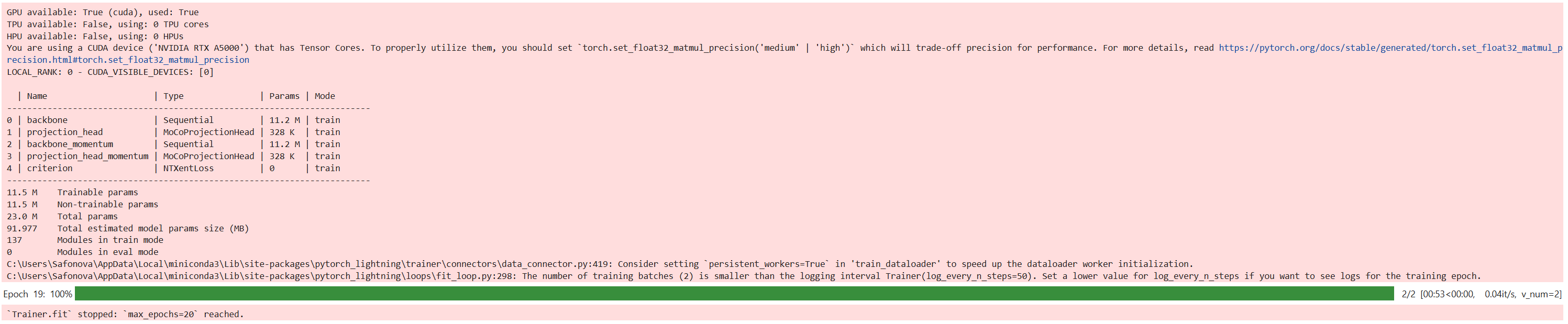
Create t-SNE plot
from sklearn.manifold import TSNE
from sklearn.preprocessing import normalize
import matplotlib.pyplot as plt
import numpy as np

# Get class names (from folder structure)
import os
class_names = sorted(os.listdir(path_to_test))

# Move backbone to GPU and set to eval mode
backbone = moco_model.backbone.cuda()
backbone.eval()

# Function to extract embeddings and labels
def generate_embeddings(backbone, dataloader):
    embeddings = []
    labels = []
    with torch.no_grad():
        for x, y, _ in dataloader:
            x = x.cuda()
            feat = backbone(x).flatten(start_dim=1)
            embeddings.append(feat.cpu())
            labels.extend(y.cpu())
    return torch.cat(embeddings).numpy(), labels

# t-SNE plot with legend
def plot_tsne(embeddings, labels):
    embeddings = normalize(embeddings)
    tsne = TSNE(n_components=2, perplexity=30, random_state=42)
    embeddings_2d = tsne.fit_transform(embeddings)

    labels = np.array(labels)
    num_classes = len(np.unique(labels))
    plt.figure(figsize=(8, 6))

    for i in range(num_classes):
        idxs = labels == i
        plt.scatter(
            embeddings_2d[idxs, 0],
            embeddings_2d[idxs, 1],
            s=8,
            label=class_names[i]
        )

    plt.legend(title="Classes")
    plt.title("t-SNE of MoCo Backbone Features")
    plt.tight_layout()
    plt.show()

# Generate and visualize
embeddings, labels = generate_embeddings(backbone, dataloader_test)
plot_tsne(embeddings, labels)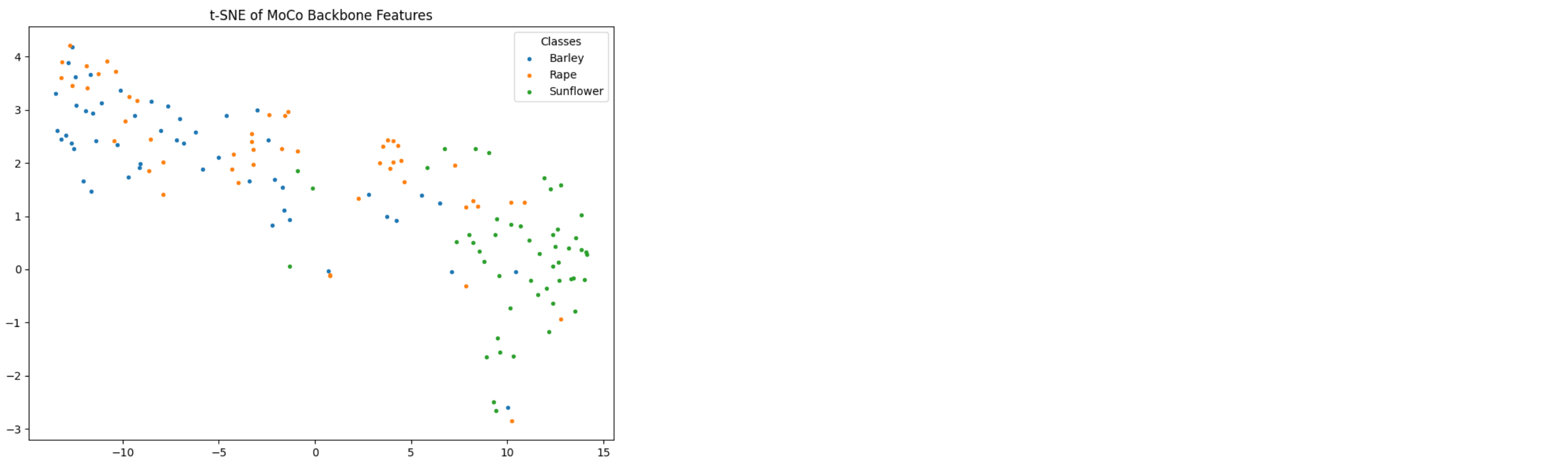
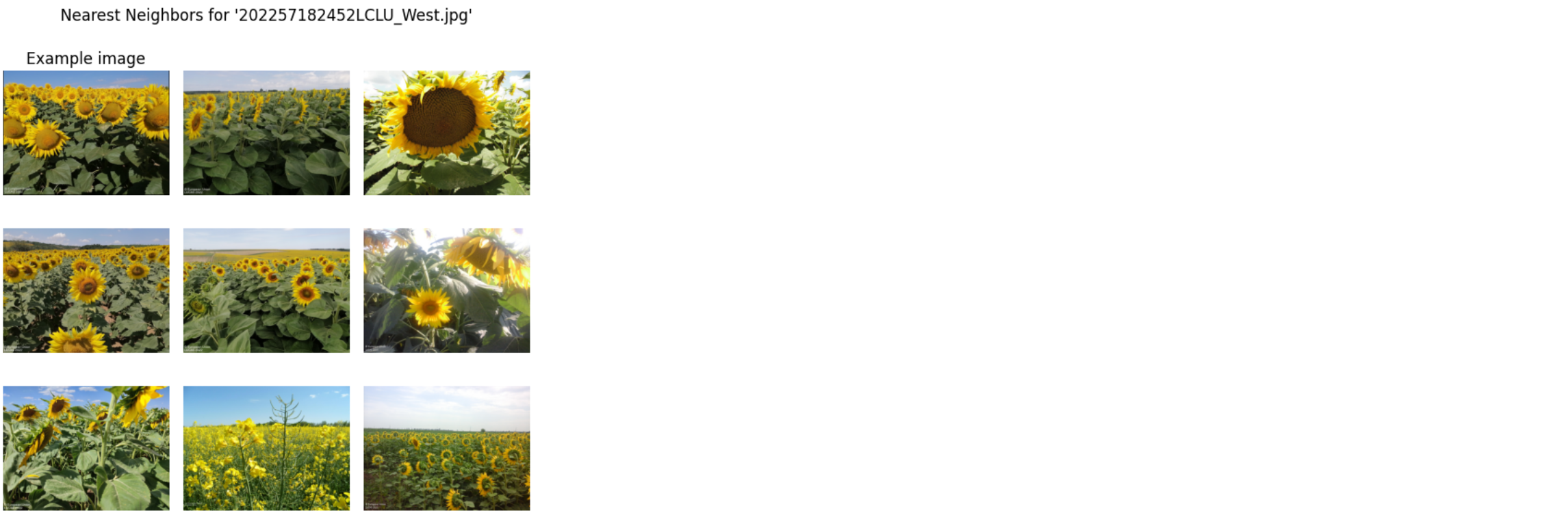
One-Stop Nearest Neighbor Visualization Code for MoCo Classifier
import os
import numpy as np
import matplotlib.pyplot as plt
from PIL import Image
import torch
from torchvision.transforms import functional as TF

# ----------------------
# 1. Extract backbone
# ----------------------
backbone = classifier.backbone.eval().cuda()  # After training the classifier

# ----------------------
# 2. Generate embeddings + filenames
# ----------------------
def generate_embeddings(backbone, dataloader):
    embeddings = []
    labels = []
    filenames = []
    with torch.no_grad():
        for x, y, fnames in dataloader:
            x = x.cuda()
            feat = backbone(x).flatten(start_dim=1)
            embeddings.append(feat.cpu())
            labels.extend(y.cpu())
            # Normalize slashes here
            filenames.extend([f.replace("\\", "/") for f in fnames])
    return torch.cat(embeddings).numpy(), labels, filenames

embeddings, labels, filenames = generate_embeddings(backbone, dataloader_test)

# ----------------------
# 3. Helper: load images
# ----------------------
def get_image(fname):
    return np.asarray(Image.open(fname).convert("RGB"))

def get_image_with_frame(fname, w=5):
    img = get_image(fname)
    h, w_, _ = img.shape
    framed = np.zeros((h+2*w, w_+2*w, 3), dtype=np.uint8)
    framed[w:-w, w:-w] = img
    return framed

# ----------------------
# 4. Plot nearest neighbors
# ----------------------
def plot_nearest_neighbors_3x3(example_image_rel, i, embeddings, filenames, path_to_data):
    fig = plt.figure(figsize=(6, 6))
    fig.suptitle(f"Nearest Neighbors for '{os.path.basename(example_image_rel)}'")

    # Ensure path format
    example_image_rel = example_image_rel.replace("\\", "/")
    example_idx = filenames.index(example_image_rel)

    # Euclidean distances
    distances = embeddings - embeddings[example_idx]
    distances = np.sum(distances**2, axis=1)
    nearest_idxs = np.argsort(distances)[:9]

    for j, idx in enumerate(nearest_idxs):
        ax = fig.add_subplot(3, 3, j + 1)
        fname = os.path.join(path_to_test, filenames[idx].replace("\\", "/"))

        if j == 0:
            img = get_image_with_frame(fname)
            ax.set_title("Example image")
        else:
            img = get_image(fname)

        ax.imshow(img)
        ax.axis("off")

    plt.tight_layout()
    plt.show()

# ----------------------
# 5. Run it with examples
# ----------------------
example_images = [
    "Barley/LUCAS2009_49962576_Cover.jpg",
    "Rape/LUCAS2006_48422710_Cover.jpg",
    "Sunflower/202257182452LCLU_West.jpg"
]

for i, img in enumerate(example_images):
    plot_nearest_neighbors_3x3(img, i, embeddings, filenames, path_to_data=path_to_test)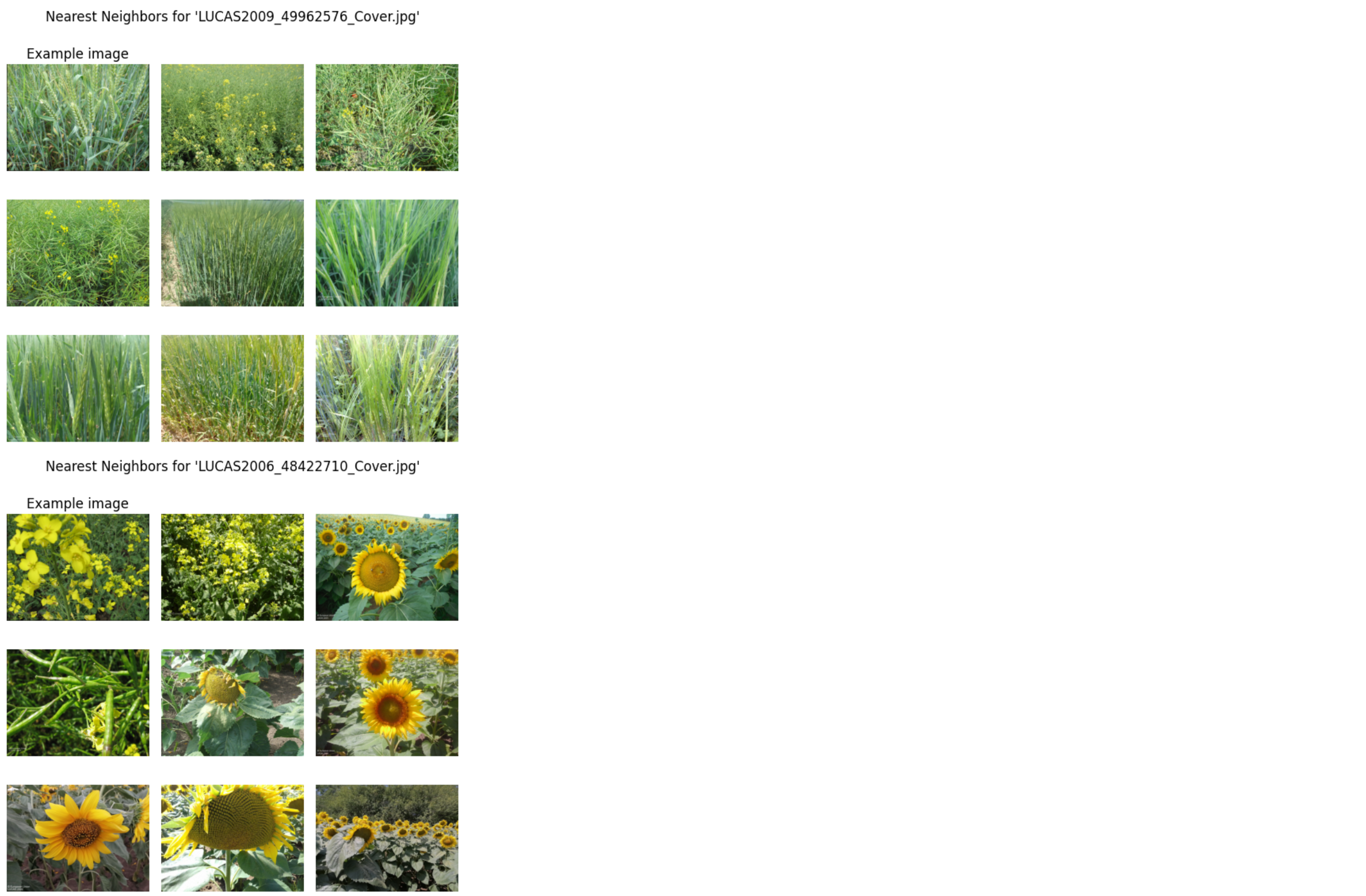
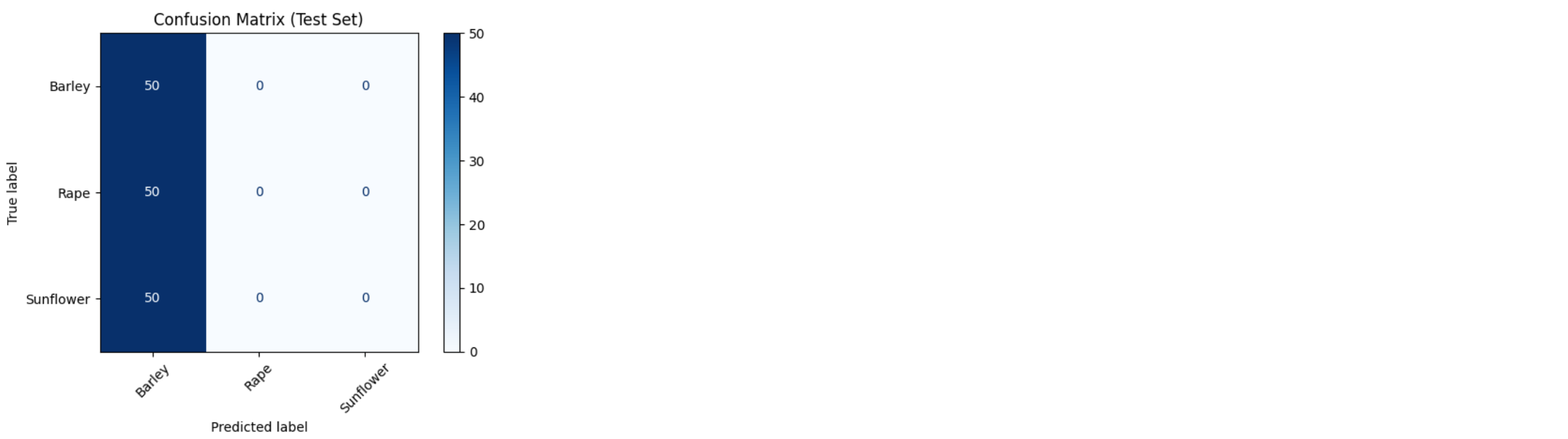
# Train classifier after MoCo
classifier = Classifier(moco_model.backbone)
trainer = pl.Trainer(max_epochs=20, devices=1, accelerator="gpu")
trainer.fit(classifier, dataloader_train_classifier, dataloader_test)

# Save classifier model
torch.save(classifier.state_dict(), "linear_classifier.pth")
classifier.to(device).eval()

correct, total = 0, 0
with torch.no_grad():
    for x, y, _ in dataloader_test:
        x, y = x.to(device), y.to(device)
        preds = classifier(x).argmax(dim=1)
        correct += (preds == y).sum().item()
        total += y.size(0)

print(f"Test Accuracy: {correct / total:.2%}")
from sklearn.metrics import confusion_matrix, ConfusionMatrixDisplay
import matplotlib.pyplot as plt

# Ensure model is on the same device
device = torch.device("cuda" if torch.cuda.is_available() else "cpu")
classifier.to(device)
classifier.eval()

all_preds = []
all_labels = []

with torch.no_grad():
    for x, y, _ in dataloader_test:
        x = x.to(device)
        y = y.to(device)

        y_hat = classifier(x)
        _, preds = torch.max(y_hat, 1)

        all_preds.extend(preds.cpu().numpy())
        all_labels.extend(y.cpu().numpy())

# Create and plot confusion matrix
cm = confusion_matrix(all_labels, all_preds)
disp = ConfusionMatrixDisplay(confusion_matrix=cm)

# Try getting class labels if using LightlyDataset
try:
    class_names = dataset_test.dataset.classes
    disp = ConfusionMatrixDisplay(confusion_matrix=cm, display_labels=class_names)
except:
    pass

disp.plot(cmap="Blues", xticks_rotation=45)
plt.title("Confusion Matrix (Test Set)")
plt.grid(False)
plt.tight_layout()
plt.show()